控制系统电子设备
本页面列出了REV Robotics控制系统中已知的电子元件及其详细说明,并附有相关注释。
Expansion Hub 内部
警告
除非你真的知道你在做什么,否则不要拆开 Control Hub 或 Expansion Hub 。它们可能会在这个过程中损坏,尤其是如果你不知道如何正确地重新组装它。
Lynx 板
“Lynx”是扩展中心(Expansion Hub)和控制中心(Control Hub)中负责与硬件交互的电路板的代号。 FTC® SDK 中提及的“Lynx”即指该电路板。该电路板似乎由 REV Robotics 和 DEKA (迪恩·卡门的公司)共同开发。反向工程得出的原理图可参见 此处 。
警告
除非你真的知道你在做什么,否则不要拆开 Control Hub 或 Expansion Hub 。它们可能会在这个过程中损坏,尤其是如果你不知道如何正确地重新组装它。

一块取出的 Lynx 电路板
处理器
Lynx 开发板使用的微控制器是 德州仪器 TM4C123GH6PGE ,搭载运行频率为 80 MHz 的 Arm Cortex-M4F 处理器。
端口
Lynx 主板具有以下端口:
两个通用异步收发设备调试端口
顶部端口从集线器中的各个子系统输出连续的高速 CSV 数据流。
底部端口以用户指定的详细程度以 115200 的波特率输出数据。
四个 I2C 端口
这些端口符合 100/400 kHz 标准。
这些端口连接到不同的总线上,因此通常无需担心地址冲突。不过,请注意,内部IMU与I2C端口0共享同一条I2C总线。
该端口上似乎集成了上拉电阻(可能使用了MCU内置的可配置上拉/下拉电阻)。
八个 DIO 端口
仅 3.3V,电流有限,可短暂提供超过额定电流规格的电流。内部拉起。
四个模拟端口
这些端口符合 5V 规范;您可以使用电平转换器向传感器提供 5V 电源,但请注意,模拟信号线应绕过电平转换器。不过,VIN 和 GND 线路必须通过电平转换器,该转换器才能正常工作。
六个舵机端口
舵机端口上的 5V 电源默认关闭,仅在使用舵机时启用。所有六个 5V 引脚一起打开和关闭,禁用一个端口上的 PWM 将关闭所有端口,直到再次使用其他舵机。
每对并排的端口额定最大电流为 2 安培,而舵机端口与 5V 端口组合的额定最大总电流为 5 安培。
两个 5V 电源端口
The pair of 5V supply ports is rated for a maximum current draw of 2 amps, and shares the total 5 amp limit with the servo ports.
四个电机端口
The motor driver is a ST Microelectronics VNH5050 motor driver IC, which is capable of handling well over the maximum amount of current an FTC motor can draw. It has integrated current sensing, and built-in thermal and current safety limits.
在PWM关断周期内,输出不会对H桥进行制动。这意味着,由于电机中的动量,在减速过程中可能会出现线性度问题。
四个编码器端口
IMPORTANT: Only two of the encoder ports (Ports 0 and 3) can accurately track position/velocity at high speeds. There are two methods of connecting an encoder internally to the Texas Instruments microprocessor, through the Quadrature Encoder Interface (QEI) and through General-Purpose Timers (GPTs). Ports 0 and 3 use the integrated QEI and are extremely accurate at high speeds, whereas encoders using the GPTs often start to lose counts at high speeds. As a result, high Count per Revolution (CPR) encoders (those with more than around 4000 counts per revolution) expected to spin somewhat quickly (such as encoders being used in odometry pods) should NOT be used on ports 1 and 2.
两个 XT30 连接器
在电缆周围移动时应小心,因为已知这些连接器会出现故障并从电路板上脱落。
此外,XT30 会随着时间的推移而磨损和松动。请参阅 XT30 引脚被压缩 - 扩展集线器故障排除,了解有关该问题的详细信息和修复方法。
USB Mini-B 连接器
采用 FTDI FT230XQ 芯片将内部 UART 与 USB 接口连接起来,从而使扩展集线器能够通过 USB 连接到控制集线器、Android 设备、计算机或其他类似设备。 FT230XQ 芯片在 USB 端支持全速 USB(12 Mbps),在 UART 端支持 3 MBaud,并可输出 5V 电压为手机充电。 据REV称,该5V输出与FTC地区目前仍合法销售的任何安卓手机均不兼容。该USB芯片被控制集线器的计算板禁用,这意味着该端口在控制集线器上开箱即用时无法正常工作。
内部连接器
This connector is what is used to connect to the compute daughterboard. It has a UART connection, as well as power and ground. All Lynx modules that came as part of an Control Hub will have this connector, but Lynx modules sold as Expansion Hubs may or may not have this connector. A Lynx board from an Expansion Hub that contains the connector, when connected with a Control Hub’s daughterboard, will work as a Control Hub. To go the other way, the Hub address has to be changed to something other than the Control Hub address of 173. You can change the address once the daughterboard is removed by plugging it into an Android device running the Robot Controller app and using the function in the settings to change the address. (Note that connecting it to another Control Hub is unlikely to work, due to the address interference between the two Lynx modules. The Driver Hub works fine for this purpose, but make sure to uninstall the Robot Controller app from it afterwards, so it doesn’t potentially interfere with the Driver Station app!)
Control Hub
Control Hub 是一个带有嵌入式 Android 单板计算机子板的 Expansion Hub 。由于内置了 Android 子板,所以它不再需要单独的手机作为 RC 。在其内部,通过内置的 UART 连接从 Android 子板发送 LynxCommand 到 Lynx 板。
该计算板基于 96Boards CE 规范,版本 1.0 ,不过目前尚不清楚除了用于连接 Lynx 板的 UART 和少量 GPIO 引脚之外,两个扩展连接器上的其他功能有多少已被接通或可正常工作。
备注
Control Hub 的原始版本(REV-31-1152)实际上使用了 Dragonboard 410c 作为计算板。 该版本的控制中心从未在FTC比赛中使用过,也不符合FTC比赛规则;它似乎仅在早期的*FIRST*® 全球赛季中使用过。
Control Hub 计算板运行的是 Android 7.1 的定制版本。其系统级芯片(SOC)上没有配备合适的散热片,仅有一个不与 SOC 接触的射频屏蔽罩,这在运行视觉处理管道等高负载任务时可能会导致热节流。 大量热量似乎是由子板PCB散发的,该PCB起到了散热片的作用。
SOC: Rockchip RK3328
CPU: Quad-core ARM® Cortex-A53
官方内核 中的设备树似乎表明,该 CPU 的最高时钟频率可达 1.5 GHz
GPU - ARM® Mali 450MP4
HDMI 2.0 支持 4k @ 60Hz 频率
RAM:1GB DDR3
存储:8 至 16GB eMMC 闪存
REV 官方列出的规格是 “8GB eMMC 4.51”,但检查的多台实际设备的电路板上都有 16GB eMMC 芯片。
REV 在一封支持电子邮件中称 “最初生产的 Control Hub 使用的是 8GB eMMC 芯片。但是,由于供应链的限制,生产了一些 16GB 版本。最近的 Control Hub(2022 年后购买)更有可能采用 16GB eMMC 芯片。”
USB:1 个 USB 3.0、1 个 USB 2.0、1 个内部 USB 2.0,用于连接 Wi-Fi 芯片
Wi-Fi: Realtek RTL8821CU
IEEE 802.11a/b/g/n/ac Wi-Fi(双频 2.4 和 5 GHz)
支持 802.11w 保护管理帧标准,以防止 身份验证攻击
蓝牙 4.2(蓝牙 4.1 由 REV 列出)
调试 UART:3 针接头(左侧 TX、中间 RX、右侧接地),1500000baud
警告
除非你真的知道你在做什么,否则不要拆开 Control Hub 或 Expansion Hub 。它们可能会在这个过程中损坏,尤其是如果你不知道如何正确地重新组装它。
小技巧
可以从 https://forum.armbian.com/topic/26978-csc-armbian-for-rk3318rk3328-tv-box-boards/ 安装 Armbian Linux 版本,并使其在 Control Hub上运行。使用 rk3318-config 命令启用 rk3318-box-led-conf3 板类型,以允许 Wi-FI 和所有 USB 端口工作。使用 armbian-config 启用 rk3328-uart1 覆盖,允许使用 /dev/ttyS1 通过内部 UART 连接与 Lynx 板通信。
在 FTC 赛事里你不应该这样做!
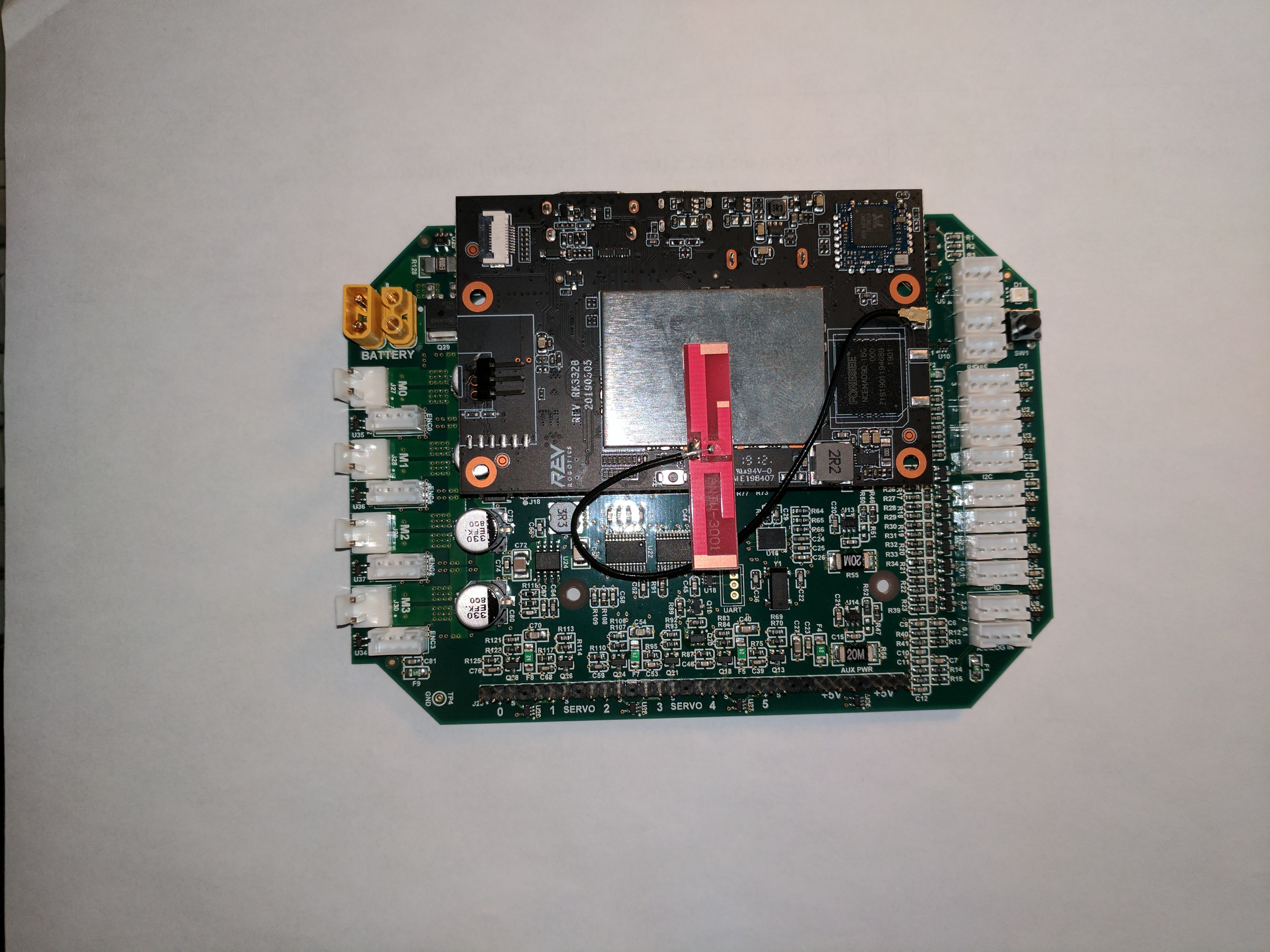
Control Hub 的单板计算机和 Lynx 板

从 Control Hub 移除的计算板